TiPToP is composed of three separate high-level modules:
- Perception: Constructs an object-centric 3D scene representation from posed RGB images and a natural-language instruction. The output includes object meshes, candidate grasps, and symbolic goal propositions.
- Planning: Uses cuTAMP, a GPU-parallelized Task and Motion Planning (TAMP) solver, to search over high-level task plans and optimize low-level robot motions and gripper actions.
- Execution: Executes the resulting trajectory open loop using a joint impedance controller, sending joint position and velocity targets directly to the robot.
Despite this modular structure, TiPToP's overall input-output (I/O) interface mirrors that of VLAs such as \(\pi_{0.5}\): RGB images and a natural-language instruction in, and low-level robot actions out. However, the modular design enables compositional generalization and the ability to solve novel tasks involving unseen objects without any task-specific data or training. When failures occur, they can be traced to specific modules for targeted debugging.
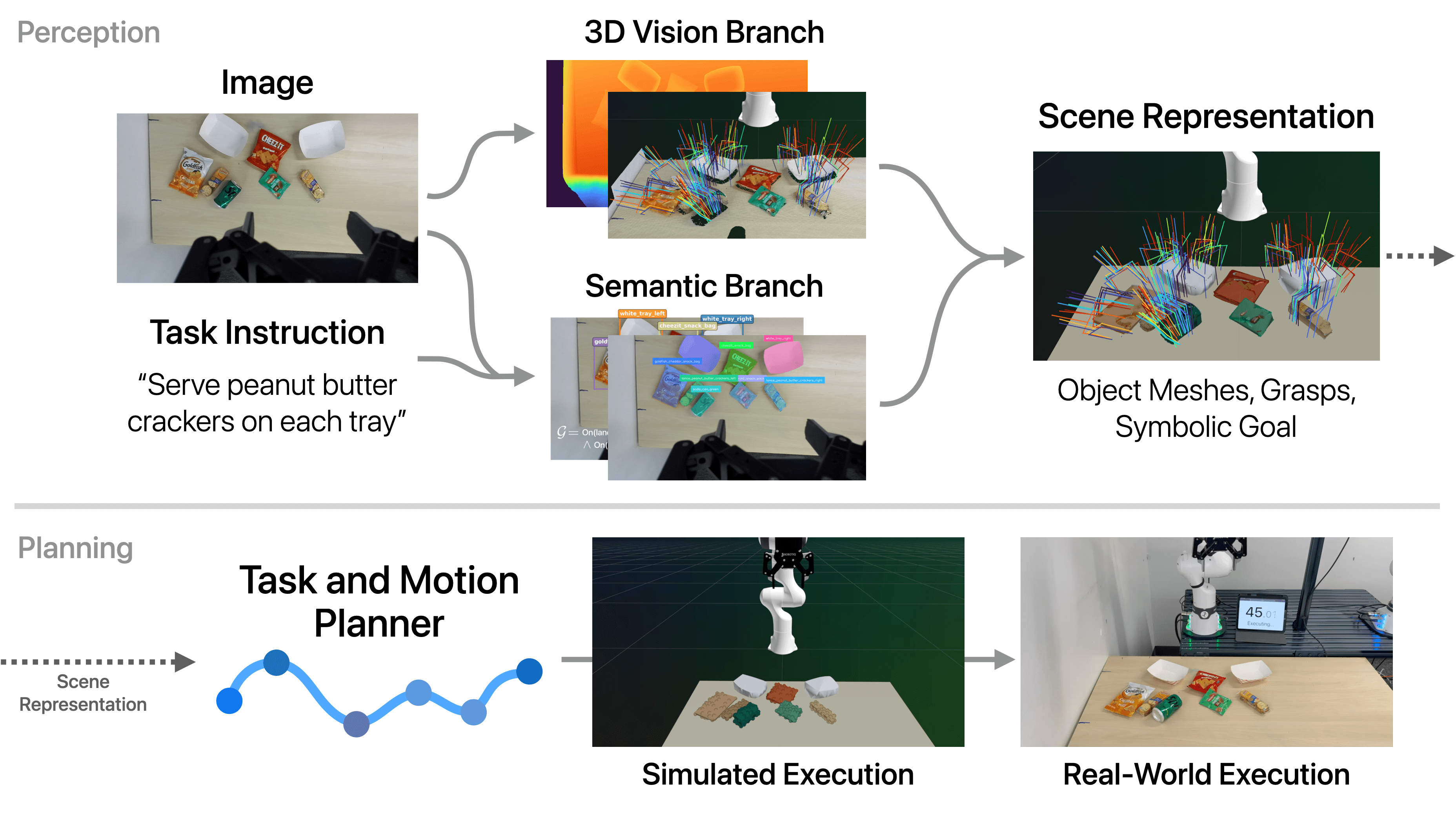
TiPToP Pipeline Overview: from RGB images and natural language instruction to robot execution
Illustrative Example. We illustrate the different stages of TiPToP on the DROID setup (Franka FR3 with a ZED Mini stereo camera mounted on the wrist) with the instruction "serve peanut butter crackers on each tray" and the scene in the figure below. This task requires identifying peanut butter crackers among visually similar snacks (Goldfish, Cheez-Its), requiring common-sense understanding and strong visual knowledge to distinguish them. Additionally, a Sprite can obstructs all grasps on the left peanut butter cracker package, complicating depth estimation due to its reflective surface and requiring the robot to move the can out of the way before grasping the crackers. We provide detailed implementation information for each module in service of a full end-to-end walkthrough of this example.
# Scene Capture
TiPToP first moves the robot to a predefined capture joint position that provides a clear view of the workspace from the wrist-mounted ZED Mini camera. We then capture a stereo RGB image pair and compute the camera pose in the world frame (camera-to-world extrinsics) using forward kinematics and the calibrated wrist-to-camera extrinsics. The stereo pair, along with the camera intrinsics and stereo baseline, is passed to the perception module.
TiPToP currently assumes a single fixed viewpoint, requiring all task-relevant objects to be at least partially visible. Objects that fall outside the camera's field of view or are fully occluded cannot be perceived and hence manipulated. We discuss this assumption and potential extensions further below in Assumptions and Future Directions.
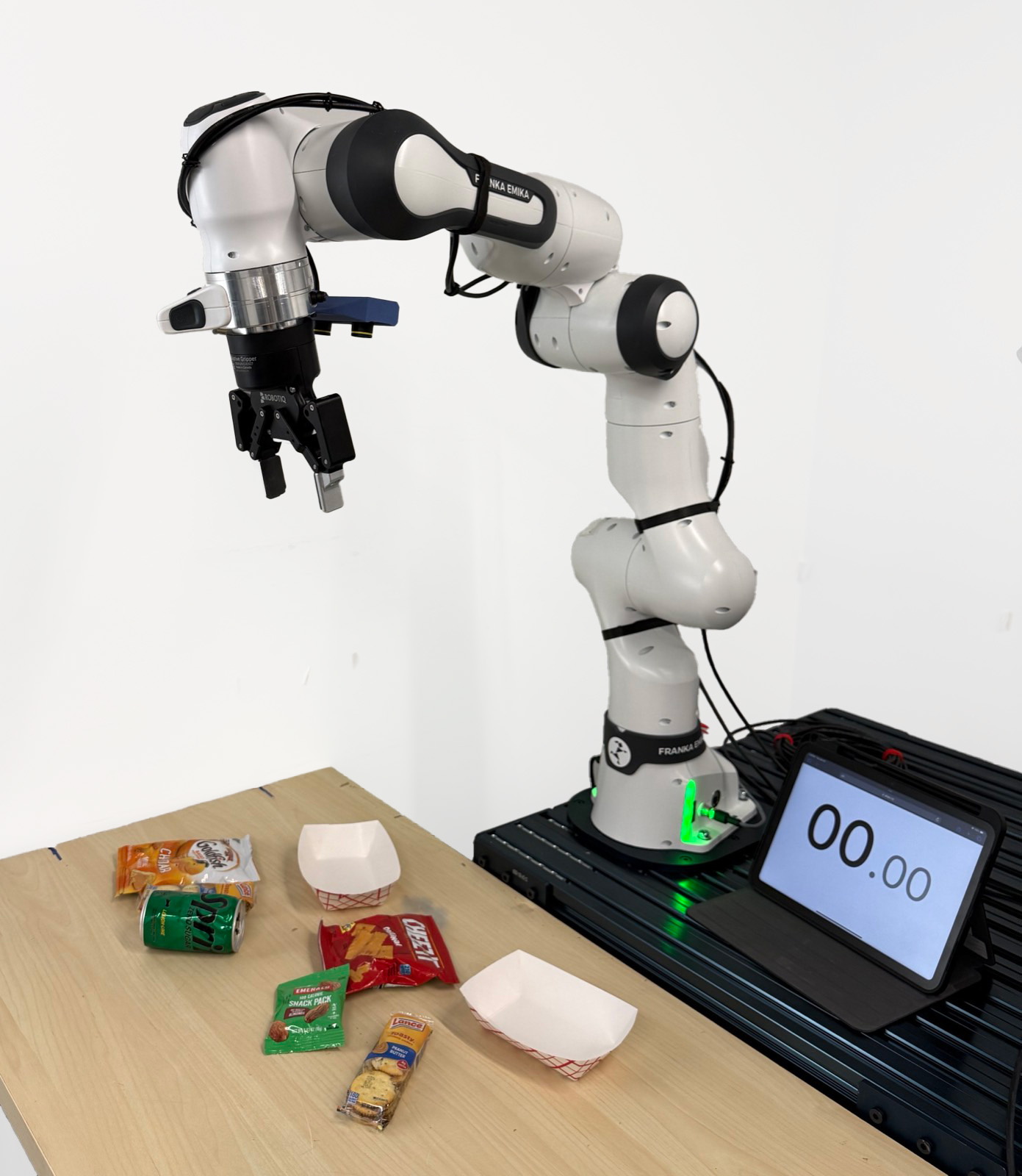
Robot in capture joint position
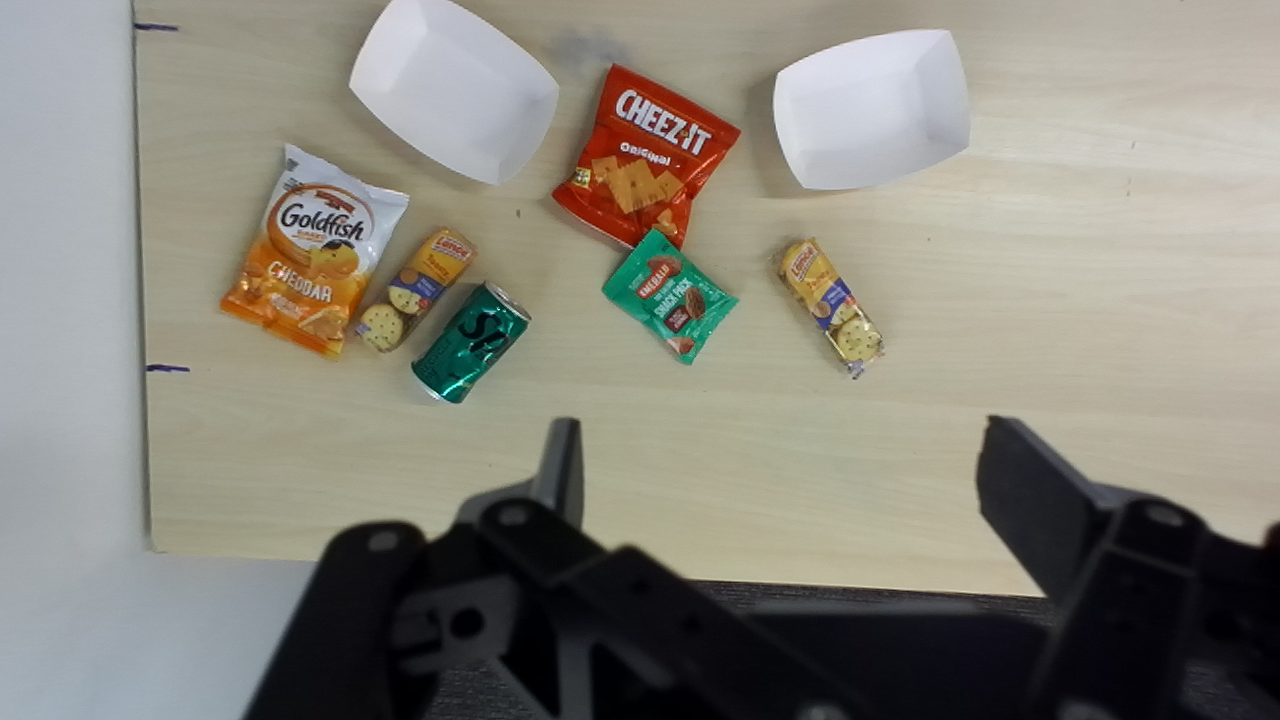
Captured image from the left camera
# Perception Module
- Natural language instruction
- Stereo RGB image pair
- Camera intrinsics and stereo baseline
- Camera-to-world extrinsics
- Detected objects with completed 3D meshes
- Candidate grasp poses for each object
- Symbolic initial state and goal condition(s)
The perception module constructs an object-centric 3D scene representation from the stereo RGB image pair and the natural-language instruction. Two branches run in parallel: (1) the 3D Vision Branch, which extracts geometry and grasp poses, and (2) the Semantic Branch, which identifies objects and grounds the task goal. These outputs are then combined to create an object-centric representation where each object is associated with a segmented point cloud, a completed mesh, and candidate grasps. The task instruction is grounded into symbolic goal propositions defined over this object-centric representation.
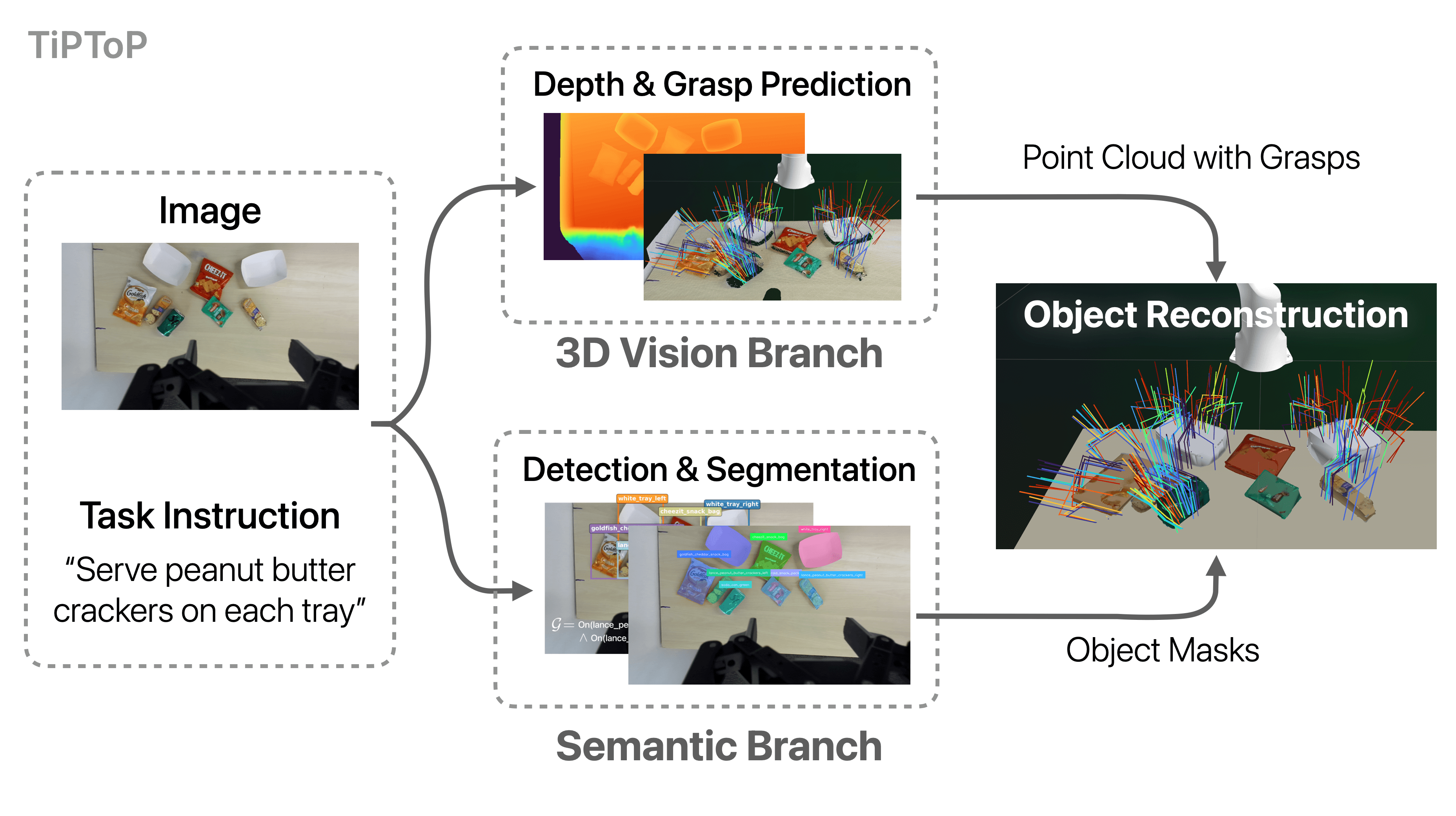
Perception module pipeline: the 3D Vision Branch and Semantic Branch run in parallel, then outputs are combined
# 3D Vision Branch
Depth Estimation (stereo RGB → depth map)
We use FoundationStereo, a foundation model for stereo depth estimation, which takes a stereo RGB pair, camera intrinsics, and the stereo baseline as input to predict a dense depth map. While the ZED Mini camera provides its own depth estimates via proprietary learned stereo matching, we found that FoundationStereo produces substantially less noisy depth maps, with reduced edge artifacts, particularly on challenging materials such as transparent and specular objects, as well as textureless surfaces commonly encountered in in-the-wild scenes.
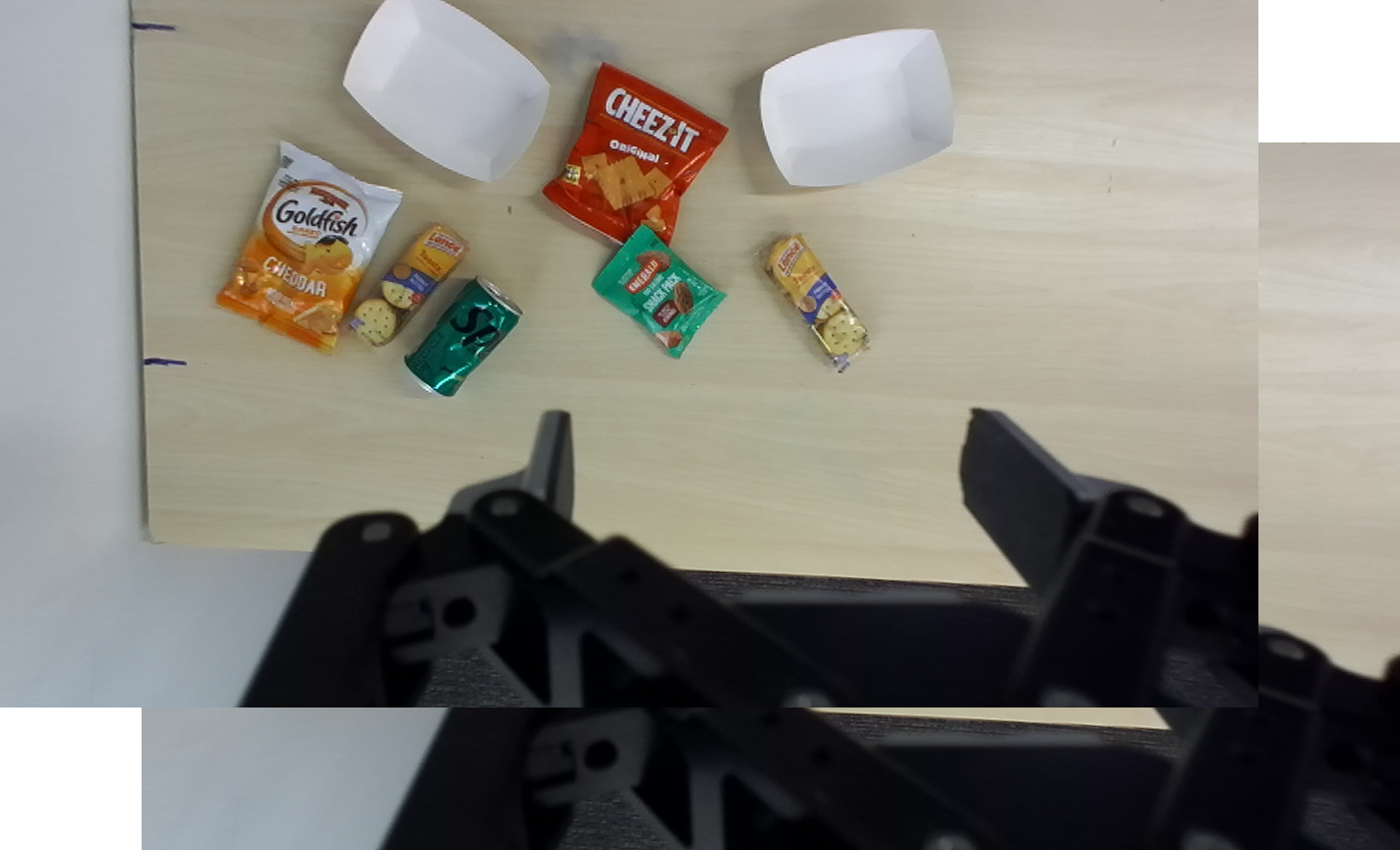
Input: Stereo image pair
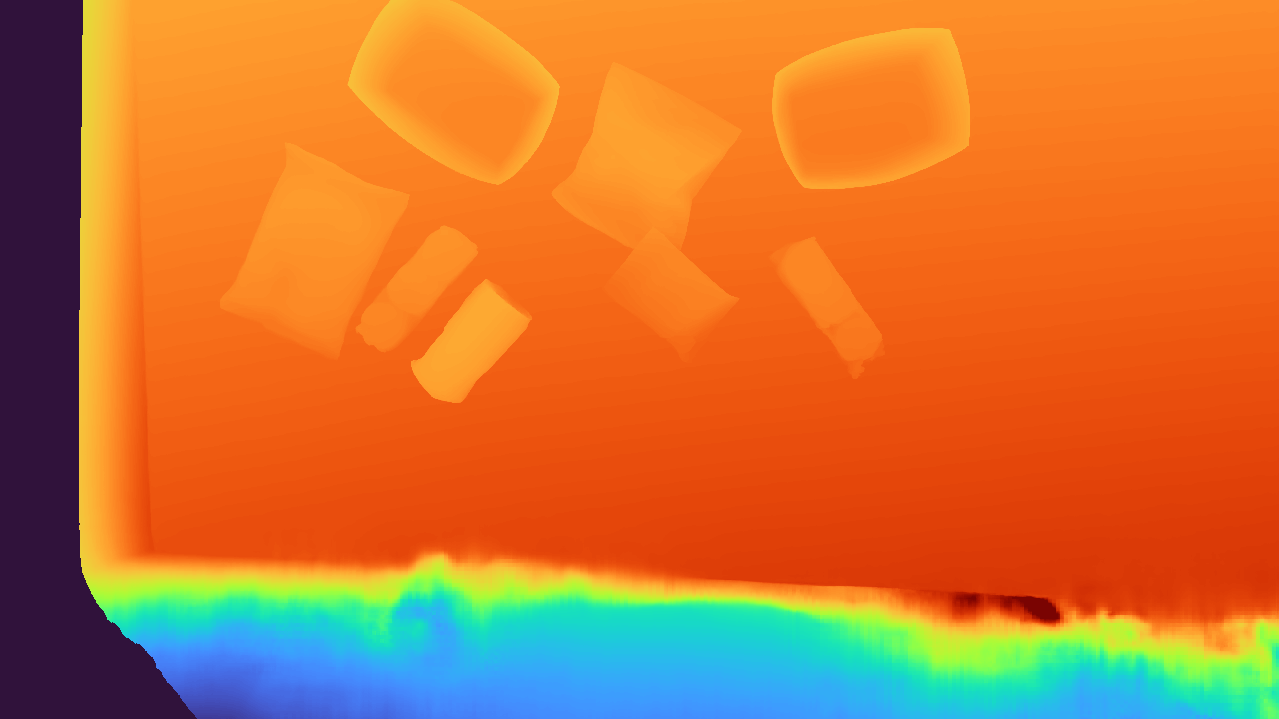
Output: Predicted depth map
Point Cloud Unprojection (depth map → point cloud)
We unproject the depth map to a 3D using the camera intrinsics and then transform the points to the world frame using the camera pose. This produces a dense point cloud of the scene. For visualization purposes, we display a downsampled version of the point cloud below.
Interactive point cloud (drag to rotate, scroll to zoom, right-click to pan)
Grasp Generation (point cloud → grasp poses)
We use M2T2 (Multi-Task Masked Transformer) to predict 6-DoF grasp poses given the entire scene point cloud. Object-to-grasp association is performed later using segmentation masks from the Semantic Branch. Because M2T2 reasons over the full scene, its predictions are informed by surrounding geometry, though they are not guaranteed to be collision-free. Having a large set of candidate grasps at this stage allows the planner to later select appropriate grasps based on the task requirements and collision constraints.
In our illustrative example, M2T2 generates candidate grasps on the trays, one cracker package, and the soda can. Note that some objects may not have predicted grasps; in such cases, we fall back to a heuristic 4-DoF grasp sampler in the planning module.
Interactive grasp visualization with candidate gripper poses (drag to rotate, scroll to zoom, right-click to pan)
We have now extracted scene-level geometry in the form of a point cloud, along with a set of candidate grasp poses. Next, we describe the Semantic Branch which runs concurrently to the 3D Vision Branch.
# Semantic Branch
Object Detection and Goal Grounding (RGB + instruction → bounding boxes + goal)
We use the Gemini Robotics-ER 1.5 Vision-Language Model (VLM) to jointly perform object detection and goal grounding from the natural-language instruction and RGB image. VLMs provide strong semantic scene understanding, common-sense reasoning, cultural knowledge, and open-vocabulary language grounding, enabling TiPToP to interpret and ground diverse instructions and images into an object-centric scene representation.
With a single query, the VLM extracts two types of information:
- Object Detection: Labels and 2D bounding boxes for objects in the scene
- Goal Grounding: The natural-language instruction is translated to a symbolic goal expressed as a conjunction of predicates (i.e., logical relations between objects). For example,
On(block, tray)specifies the block should be on the tray. Though we currently support one predicateOn, we demonstrate defining additional predicates for new skills in Extending Beyond Pick-and-Place.
The VLM leverages its vision-language capabilities to identify task-relevant objects, assign appropriate labels, resolve references in the instruction, and ground the instruction into a symbolic goal accordingly. In our example with "serve peanut butter crackers on each tray", the VLM correctly identifies that "peanut butter crackers" refers to the two Lance cracker packages among other snacks (Goldfish crackers, Cheez-It crackers, nuts), and reasons that "each tray" requires placing one package on each.
View Gemini Prompt Template
Perform two tasks on this image based on the task instruction: "{task_instruction}".

TASK 1 - OBJECT DETECTION:
Detect and return bounding boxes for objects in the image.
- DO NOT include the robot, robot gripper, or table surface
- DO NOT include objects or surfaces irrelevant to the task or too far away to matter (e.g. walls, things on the wall that are far away, things on the floor below the table, people who might be in the scene, etc.)
- Limit to 25 objects
- If an object appears multiple times, name them by unique characteristics (color, size, position, etc.). If they seem the same, then just use numbers (e.g. 'soda_can1' and 'soda_can2', ... for identical-looking soda cans)
- An object **cannot have the same name** as another under any circumstance.
- Format: normalized coordinates 0-1000 as integers

Be very careful to identify objects and name them in a way that's relevant to the task. If the task involves picking up a red apple, make sure that 'red' appears in the name of the apple.


TASK 2 - TASK TRANSLATION:
Translate this natural language instruction into some conjunction of formal predicates:

AVAILABLE PREDICATES:
- on(movable, surface): Object A is placed on top of object B

It is very important that the goal is exact: use your visual recognition, common-sense and reasoning abilities to make sure the goal expression is perfectly accurate.

For instance - for the task "throw away the trash in the bin" when there is a bin, an open empty chips packet, an empty soda can, a closed and full soda bottle, and several full candy bars on the table, the goal should be:

"predicates": [
        {"name": "on", "args": ["chips_packet", "bin"]},
        {"name": "on", "args": ["soda_can", "bin"]},
]

This is because only the chips and soda are empty and clearly trash. Everything else is still usable!


Return a single JSON object with this structure (no code fencing):
{
    "bboxes": [
        {"box_2d": [ymin, xmin, ymax, xmax], "label": "object name"},
        ...
    ],
    "predicates": [
        {"name": "predicate_name", "args": ["object1", "object2"]},
        ...
    ]
}

Use the object labels you detect in Task 1 when creating predicates in Task 2.
Only reference objects that you actually detected in the image.
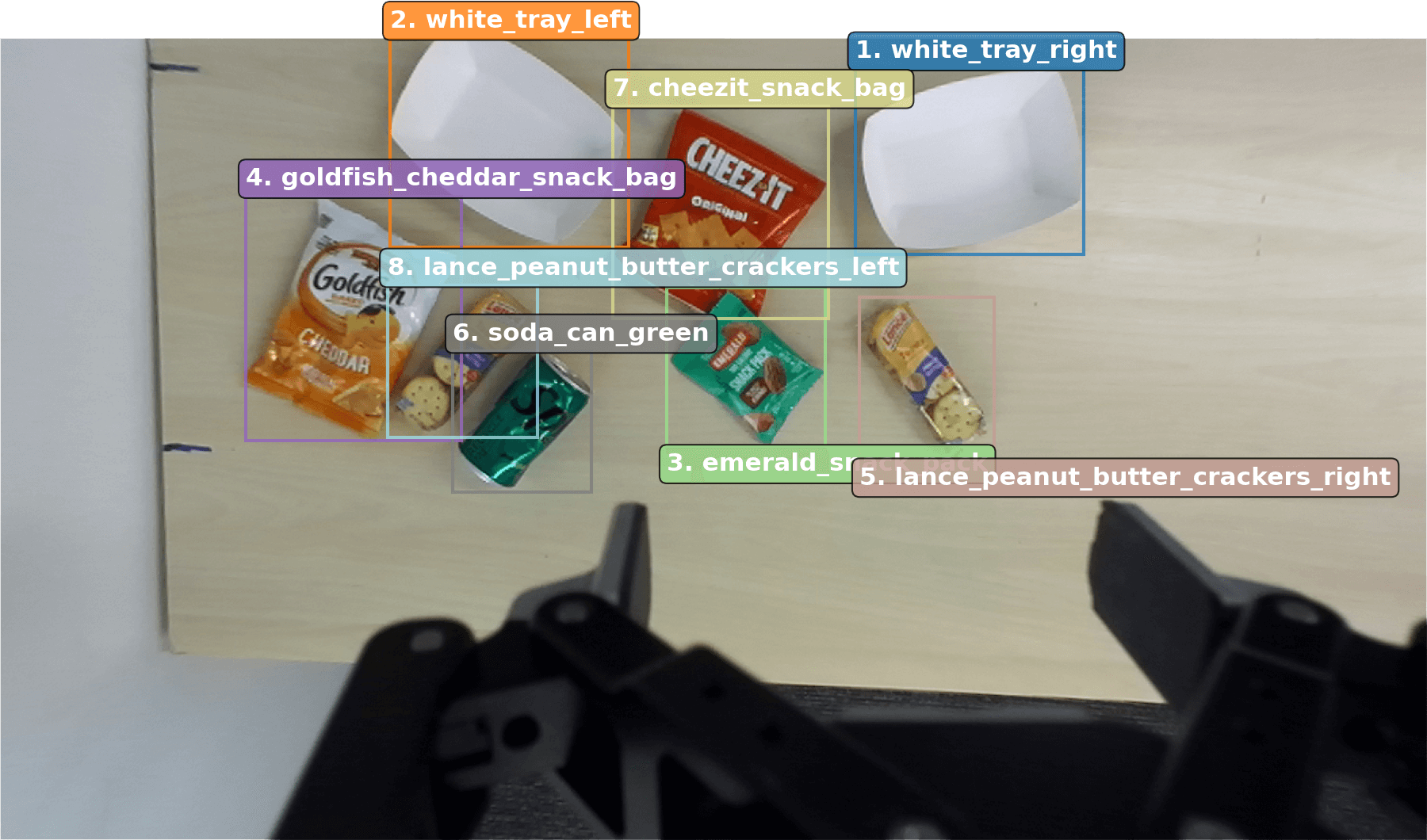
Task instruction: "Serve peanut butter crackers on each tray"
Grounded goal: On(lance_peanut_butter_crackers_right, white_tray_right) ∧ On(lance_peanut_butter_crackers_left, white_tray_left)
Object Segmentation (bounding boxes → segmentation masks)
For each detected bounding box from the VLM, we use Segment Anything Model 2 (SAM 2) to generate pixel-level segmentation masks for each object, delineating object boundaries. These masks are later combined with the scene point cloud (from the 3D Vision Branch) to extract per-object geometry and assign grasps to specific objects.
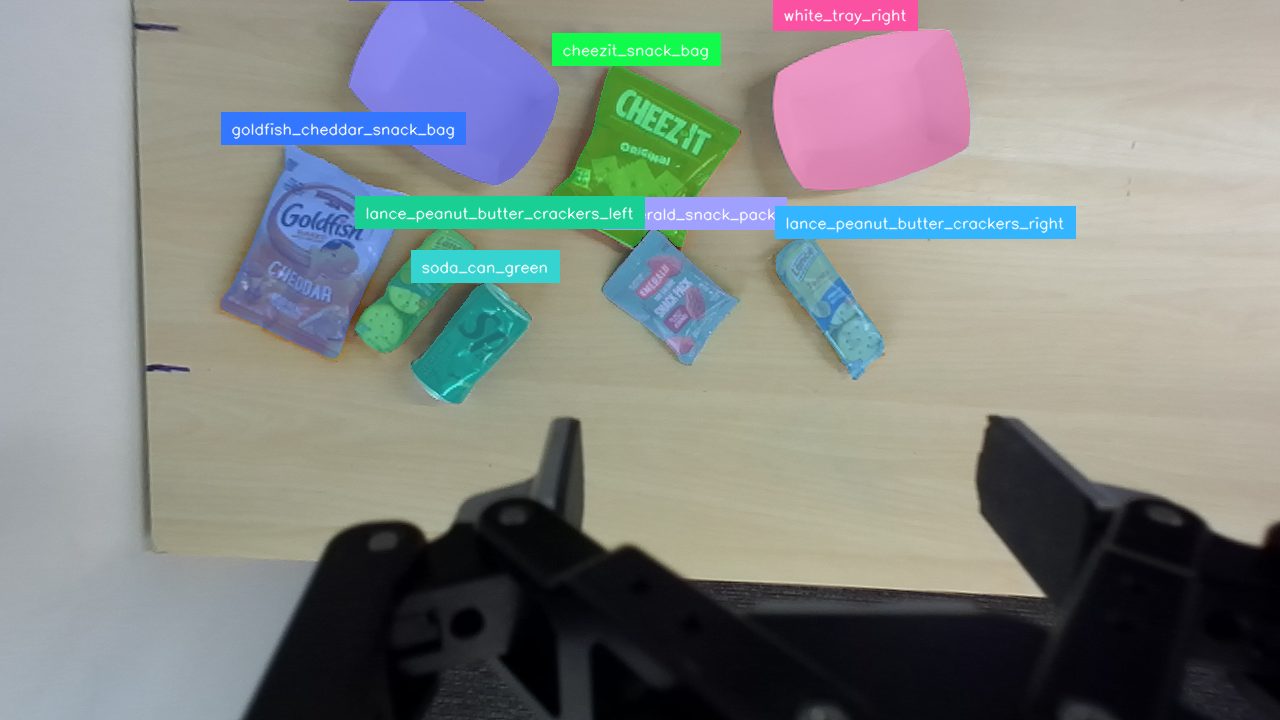
Output: segmentation masks for each object
# Combining Outputs
We combine scene-level geometry and candidate grasps from the 3D Vision Branch with object identities and segmentation masks from the Semantic Branch into an object-centric 3D scene representation, producing per-object meshes with assigned grasps for the Planning module.
Table Detection
We apply RANSAC to the scene point cloud to fit the dominant horizontal planar surface, which we assume to be the table. This assumption could be relaxed by detecting multiple support surfaces (e.g., tables, floors, cabinets) via semantic segmentation or multi-plane fitting.
Per-Object Mesh Reconstruction
We use the segmentation mask of each detected object to extract the corresponding points from the scene point cloud, project them downward along the z-axis to the object's lowest observed point, and compute the convex hull to form a watertight mesh. We project to each object's own lowest point rather than to the table, as objects may rest on each other. However, as TiPToP only uses a single input viewpoint, some objects may have incomplete geometry due to partial observability. Despite this, we find that the convex-hull approximation is sufficient for many pick-and-place tasks, as they usually result in overapproximations which are preferable for collision avoidance.
Grasp-to-Object Assignment
Each grasp predicted by M2T2 is assigned to the nearest object by querying its contact point against a KDTree built from all object point clouds. Grasps whose nearest object point exceeds a distance threshold are discarded, as these typically arise from point cloud noise or partial observability.
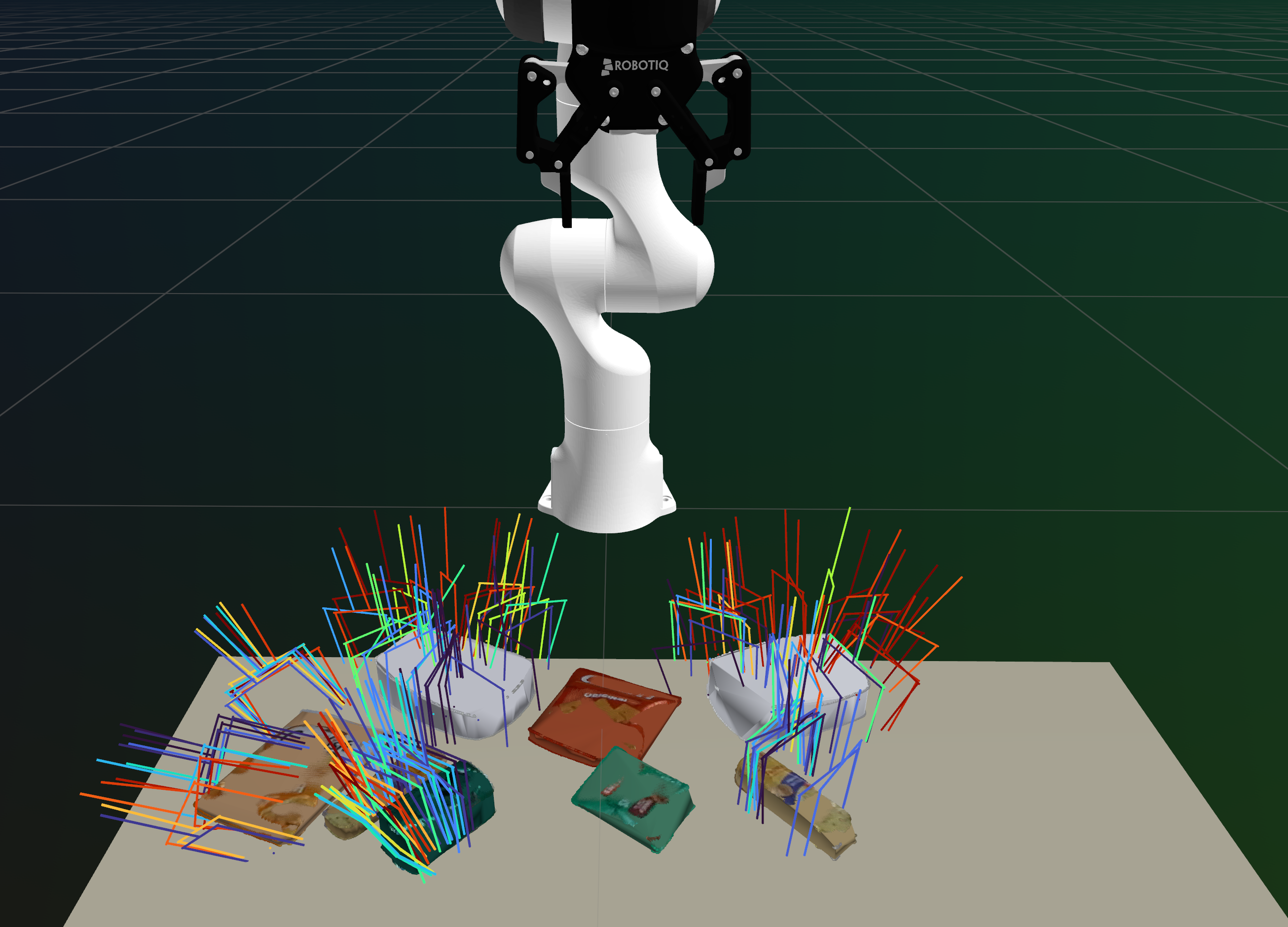
Completed object meshes from convex hull completion with assigned 6-DoF grasps, used for collision checking, grasp planning, and placement planning in the Planning module.
# Planning Module
- Object-Centric 3D Scene representation
- Symbolic goal propositions (from VLM)
- Sequence of joint trajectories (positions and velocities) with gripper open and close commands
TiPToP uses cuTAMP, a GPU-parallelized Task and Motion Planning (TAMP) algorithm, to search over discrete high-level plan skeletons (sequences of symbolic actions such as pick and place) and optimize low-level continuous parameters (grasp poses, placement poses, and collision-free trajectories) to produce a full manipulation plan. The object-centric 3D scene representation is used to evaluate these actions by reasoning over their kinematic and geometric feasibility, while the symbolic goal propositions are used by a PDDL-style symbolic planner to generate plan skeletons.
cuTAMP operates primarily over pick-and-place primitives, though it can be extended to support additional primitives such as wiping (see Extending Beyond Pick-and-Place). We chose cuTAMP for its fast solution times on a single GPU and its ease of installation, and made several extensions to improve its real-world deployability (see Appendix A in the accompanying TiPToP paper). We refer the reader to the cuTAMP paper for additional details about cuTAMP, and provide a walkthrough below.
cuTAMP Pipeline
- Plan Skeleton Enumeration. Given the symbolic goal, cuTAMP uses a PDDL-style symbolic planner to enumerate candidate plan skeletons without committed continuous parameters.
- Particle Initialization. For each skeleton, cuTAMP initializes a large batch of candidate solutions called particles by sampling continuous parameters in parallel.
- Particle Optimization. cuTAMP ranks skeletons and performs differentiable GPU-parallelized optimization to refine all the particles toward satisfying the plan skeleton's constraints (e.g., collision-free grasps, stable placements, collision-free trajectories).
- Motion Planning. For each satisfying particle, cuTAMP invokes cuRobo, a GPU-accelerated motion planner, to solve for collision-free, time-parameterized trajectories.
# cuTAMP Walkthrough
We continue our walkthrough with the grounded goal from the perception module:
Task instruction: "Serve peanut butter crackers on each tray"
Grounded goal:
On(lance_peanut_butter_crackers_right, white_tray_right)
∧ On(lance_peanut_butter_crackers_left, white_tray_left)
Object detection from the Semantic Branch
Given the symbolic goal propositions, cuTAMP first enumerates candidate high-level plan skeletons using a PDDL-style symbolic planner. Each plan skeleton specifies a sequence of symbolic actions (e.g., pick and place) without committing to continuous parameters such as grasp poses, placement poses, or robot trajectories. The symbolic planner generates multiple candidate skeletons that differ in action ordering, and may also include actions to move potentially obstructing objects out of the way. At this stage, the planner does not consider explicit object or scene geometry, nor robot feasibility; these aspects are considered later during particle initialization and optimization.
Example Plan Skeletons
Skeletons 1 and 2 differ only in the order objects are picked and placed. Skeleton 9 includes an additional Pick and Place to move the soda_can_green out of the way first. We omit MoveFree and MoveHolding actions for collision-free trajectories between picks and places for clarity; see Listing 1 in the cuTAMP paper for details.
Skeleton 1: Serve right cracker first, then left cracker
1. Pick(lance_peanut_butter_crackers_right, grasp1, q1)
2. Place(lance_peanut_butter_crackers_right, grasp1, pose1, white_tray_right, q2)
3. Pick(lance_peanut_butter_crackers_left, grasp2, q3)
4. Place(lance_peanut_butter_crackers_left, grasp2, pose2, white_tray_left, q4)
Skeleton 2: Serve left cracker first, then right cracker
1. Pick(lance_peanut_butter_crackers_left, grasp1, q1)
2. Place(lance_peanut_butter_crackers_left, grasp1, pose1, white_tray_left, q2)
3. Pick(lance_peanut_butter_crackers_right, grasp2, q3)
4. Place(lance_peanut_butter_crackers_right, grasp2, pose2, white_tray_right, q4)
Skeleton 9: Serve right cracker, move soda can out of the way, then serve left cracker
1. Pick(lance_peanut_butter_crackers_right, grasp1, q1)
2. Place(lance_peanut_butter_crackers_right, grasp1, pose1, white_tray_right, q2)
3. Pick(soda_can_green, grasp2, q3)
4. Place(soda_can_green, grasp2, pose2, table, q4)
5. Pick(lance_peanut_butter_crackers_left, grasp3, q5)
6. Place(lance_peanut_butter_crackers_left, grasp3, pose3, white_tray_left, q6)
For each plan skeleton, cuTAMP initializes a large batch of continuous candidate solutions, called particles, by sampling action-specific parameters. Grasp poses are sampled from M2T2 predictions when available (or using a 4-DoF heuristic sampler otherwise). Placement poses are sampled on target surfaces conditioned on the sampled grasps, and corresponding robot configurations are computed via inverse kinematics. At this stage, the initialized particles may violate the plan skeleton's constraints, including stable placement, kinematic feasibility, and collision avoidance.
cuTAMP ranks the plan skeletons using a heuristic based on the feasibility of the initialized particles, and optimizes them in ranked order. For each skeleton, cuTAMP performs differentiable GPU-parallelized optimization over the associated particle batch to satisfy all low-level constraints. The optimization jointly determines feasible grasp poses, placement poses, and intermediate robot configurations, while motion planning connects these configurations with collision-free trajectories. If optimization succeeds, cuTAMP invokes collision-free motion planning via cuRobo to generate smooth, time-parameterized trajectories consisting of joint positions, joint velocities, and gripper commands. If either optimization or motion planning fails, cuTAMP moves on to the next skeleton until a valid solution is found or the planning budget is exhausted.
In our example, cuTAMP ranks Skeleton 1 (serve right cracker first) highest and optimizes it first, with 256 particles and 36 degrees of freedom per particle (9,216 parameters). Skeletons 1 and 2 both fail to find any satisfying particles due to kinematic constraints, as the soda_can_green obstructs all grasps to lance_peanut_butter_crackers_left. cuTAMP then moves on to Skeleton 9, which first moves the obstruction out of the way. This skeleton has 54 degrees of freedom per particle (13,824 parameters) due to the additional pick-and-place. cuTAMP finds 28 satisfying particles and then proceeds to motion planning.
Optimization Log
cuTAMP uses gradient-based optimization to satisfy constraints across all particles in parallel. The log below (condensed for presentation) shows the constraint satisfaction after optimization:
[Opt 1] Skeleton 1: Serve right cracker first, then left cracker
Optimizing 9,216 parameters (256 particles × 36 DOF)
0/256 satisfying after optimization (KinematicConstraint pos_err failed)

[Opt 2] Skeleton 2: Serve left cracker first, then right cracker
Optimizing 9,216 parameters (256 particles × 36 DOF)
0/256 satisfying after optimization (KinematicConstraint pos_err failed)

[Opt 3] Skeleton 9: Serve right cracker, move soda can, then serve left cracker
Optimizing 13,824 parameters (256 particles × 54 DOF)

Found first solution in 18.82s
Found 28 satisfying particles (10.9% of 256)

Constraint satisfaction (satisfying / total):
├─ Collision: robot_to_world         249/256
├─ Collision: movable_to_world       246/256
├─ Collision: robot_to_movables      142/256
├─ Collision: object_to_object       251-256/256 (all pairs)
├─ StablePlacement: white_tray_right 236/256 (in_xy), 252/256 (support)
├─ StablePlacement: table            253/256 (in_xy), 238/256 (support)
├─ StablePlacement: white_tray_left  241/256 (in_xy), 254/256 (support)
├─ Motion: joint_limits              251/256
├─ Motion: self_collision            256/256
├─ Kinematic: position_error ≤ 5mm    96/256
└─ Kinematic: rotation_error ≤ 0.05  131/256

Final: 28/256 particles satisfy ALL constraints
Visualization of the cuTAMP optimization, which depicts the placement poses and robot configuration in the final state. Note the dark green object, which corresponds to the Sprite can, moving around. The spheres protruding from the objects correspond to the spheres used by cuTAMP for collision checking.
Motion Planning Log
cuRobo generates collision-free trajectories for each segment: MoveFree (moving with empty gripper), MoveHolding (moving while holding an object), and approach/retract motions for picks and places. If motion planning fails for any segment, cuTAMP tries the next satisfying particle. Log condensed for presentation:
Trying cuRobo planning with satisfying particle 1/28
 1. MoveFree(q0 → q1)                    ✓
 2. Pick approach                        ✓
 3. MoveHolding(q1 → q2)                 ✓
 4. Place approach                       ✓
 5. MoveFree(q2 → q3)                    ✓
 6. Pick approach                        ✓
 7. MoveHolding(q3 → q4)                 ✓
 8. Place approach                       ✓
 9. MoveFree(q4 → q5)                    ✓
10. Pick approach                        ✗ Failed
    Failed to plan from approach to end for Pick(lance_peanut_butter_crackers_left, ...)

Trying cuRobo planning with satisfying particles 2-4/28...
    All failed at Pick(lance_peanut_butter_crackers_left, ...)

Trying cuRobo planning with satisfying particle 5/28
 1. MoveFree(q0 → q1)                    ✓
 2. Pick approach                        ✓
 3. MoveHolding(q1 → q2)                 ✓
 4. Place approach                       ✓
 5. MoveFree(q2 → q3)                    ✓
 6. Pick approach                        ✓
 7. MoveHolding(q3 → q4)                 ✓
 8. Place approach                       ✓
 9. MoveFree(q4 → q5)                    ✓
10. Pick approach                        ✓
11. MoveHolding(q5 → q6)                 ✓
12. Place approach                       ✓
13. Return to home                       ✓

Motion planning complete (13 trajectory segments)
Final planned trajectory from cuRobo (1x speed)
# Execution Module
The execution module executes the planned trajectory, which includes joint positions, joint velocities and gripper commands, on the robot. Accurately tracking trajectories is crucial, since the planner assumes consistency between the robot's joint-space execution and the resulting scene configuration. Even sub-centimeter tracking errors can cause grasps or placements to fail. We implemented our own joint-space impedance controller for Franka arms called Bamboo, because existing open-source controllers, including DROID's default Polymetis controller, were unable to track timed trajectories sufficiently precisely.
TiPToP does not monitor execution or replan based on execution-time observations (i.e., it is open-loop with respect to visual observations). This succeeds when the world is static and trajectories are tracked accurately, but fails when objects move unexpectedly or grasps slip.
# Joint Impedance Controller
For the Franka FR3 robot used as part of the DROID setup, we implemented a joint impedance controller to track the planned trajectory waypoints by computing joint torques at each control timestep:
\( \tau = K_p \odot (q_d - q) + K_d \odot (\dot{q}_d - \dot{q}) + \tau_{\text{coriolis}} + \tau_g + M\ddot{q}_d \)
where \( K_p \) and \( K_d \) are per-joint position and velocity gains, \( \tau_{\text{coriolis}} \) compensates for Coriolis forces, \( \tau_g \) compensates for gravity, \( M \) is the mass matrix, and \( \ddot{q}_d \) is the desired acceleration estimated via filtered numerical differentiation of \( \dot{q}_d \). The term \( M\ddot{q}_d \) compensates for the robot's inertia. The gains \( K_p \) and \( K_d \) were tuned to improve trajectory tracking, though the controller still exhibits small deviations during execution at high speeds (typically up to 5mm position error).
We have open-sourced our controller for the Franka FR3 and Panda robots, called Bamboo, on GitHub: https://github.com/chsahit/bamboo.
Real robot execution for "Serve peanut butter crackers on each tray" (1x speed)
# Assumptions and Future Directions
TiPToP makes several simplifying assumptions. The modular design makes it straightforward to address each by improving individual components.
# System Limitations
Open-loop execution
We do not monitor execution or replan. This works when the world is static and trajectories are tracked accurately, but fails when objects move unexpectedly or grasps slip. Closed-loop execution via perception-replanning loops is perhaps the most impactful improvement: re-attempting failed grasps, recovering from unexpected object movements, and adapting to scene changes would significantly improve robustness. Alternatively, VLAs or learned policies could provide reactive low-level behaviors that adapt to disturbances, complementing the TAMP system's physical reasoning.
# Perception Limitations
Single-viewpoint perception
We capture images from a single fixed pose, so all task-relevant objects must be at least partially visible from that viewpoint. We cannot reason about objects in drawers, behind obstacles, or outside the camera's field of view. Multi-view perception via active camera movement before planning, or additional static cameras, would reduce occlusions and improve shape estimates.
VLM detection reliability
We rely on a VLM (Gemini Robotics-ER) for object detection and goal grounding. The VLM occasionally fails to detect task-relevant objects or hallucinates incorrect bounding box locations. Ensemble methods that combine multiple VLMs or detection models, or verification loops that check detections against point cloud evidence, could improve robustness.
Convex object approximation
Our mesh completion assumes objects can be approximated by their convex hull and that the visible portion is representative of the full geometry. This fails for highly non-convex objects or objects with significant self-occlusion. Learned shape completion methods like SAM 3D or SceneComplete could produce more accurate meshes, improving both collision checking and grasp planning.
Single support surface
We use RANSAC to identify a single dominant planar surface (the table) as the support for all objects. This fails in scenes with multiple support surfaces at different heights (e.g., shelves, stacked platforms). Detecting multiple surfaces via multi-plane fitting or semantic segmentation would enable planning in more complex environments.
Grasp generation
M2T2 generates scene-level grasps that work well for many objects, but often fails to detect grasps on small objects or unusual geometries. When M2T2 grasps are unavailable, we fall back to a 4-DoF top-down heuristic sampler, which is less robust. Object-specific grasp networks or task-oriented grasps (e.g., grasps suited for placement vs. handover) could improve manipulation success rates on challenging objects.
# Planning Limitations
The following are limitations of our current cuTAMP implementation rather than fundamental TAMP limitations.
Pick-and-place only
We only support the On predicate and pick-and-place actions. Tasks requiring pushing, pouring, tool use, or articulated object manipulation (opening drawers, doors) are not supported. Richer action primitives could be added by specifying their preconditions and effects, as we show in Extending Beyond Pick-and-Place. These could be manually engineered or implemented by calling a VLA with specific language instructions.
Deterministic planning
cuTAMP assumes deterministic action outcomes and full observability of the current state. This prevents reasoning about uncertain grasp success, object pose uncertainty, or hidden state. Belief-space planning that reasons over probability distributions over states would enable more robust behavior under uncertainty and could incorporate information-gathering actions.
Kinematics-only
cuTAMP only models kinematics, not force closure, contact dynamics, or other physical interactions. This limits reasoning about manipulation actions that depend on forces or frictional contact. Physics-aware planning that incorporates contact dynamics or learned physical models could enable more complex manipulation strategies.
Offline planning
TiPToP plans offline and executes open-loop, which limits reactivity during execution. Faster optimization (for instance via JAX with just-in-time compilation) and parallelized motion planning using massive CPU parallelism could reduce planning time enough to enable online replanning.
Rigid grasping
We assume grasped objects remain rigidly attached to the gripper throughout manipulation. When objects slip or rotate in the gripper (due to weight, inertia, or unstable grasps), the planned placement poses become invalid. In-hand pose estimation could detect and correct for object motion during grasps, or the system could replan when slippage is detected.
All of these directions have been the subject of substantial prior research, and we believe extensions based on such work could be incorporated into TiPToP. Its modular design means that improvements to any single component can benefit the whole system, and we welcome contributions from the community to help address these limitations.
© 2026 TiPToP Authors